Steve Jobs on the iPhone 3G: Faster, cheaper, wider

What Jobs talks about
Steve Jobs opens WWDC 2008 by saying Apple has three parts: Mac, music, and now the iPhone. He then focuses the keynote on the iPhone 2.0 platform, the App Store, enterprise support, and the developer SDK.
A major part of the talk is the case for the iPhone as a serious platform for businesses and developers. Jobs shows Exchange support, secure VPN, and native apps from companies like Sega, eBay, TypePad, and MLB.com, arguing that the SDK makes powerful mobile software much easier to build.
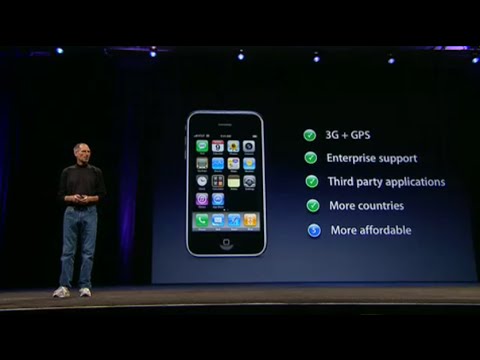
He closes by introducing the iPhone 3G, emphasizing faster data, built-in GPS, broader carrier rollout, and a much lower price. The message is that Apple is making the iPhone more capable and more accessible at the same time.
Jobs speaks throughout, with presentations from Scott Forstall, Phil Schiller, Bertrand Serlet, and several app developers.
In his words
“As you know, Apple consists of three parts.”
“This morning I'm going to talk about the iPhone and everything related to it.”
“We believe we have a fantastic platform here for people to create amazing apps.”
“This is madness.”
“Introducing the new iPhone 3G.”
Key points
- The iPhone is now one of Apple’s three core businesses.
- iPhone 2.0 adds enterprise features like Exchange push mail, contacts, calendars, and remote wipe.
- The SDK gives developers native APIs, tools, and a simulator for building iPhone apps.
- Jobs highlights early App Store apps from major companies and independent developers.
- The iPhone 3G is faster, has GPS, and has much better battery life.
- Apple is lowering the price to $199 and expanding to 70 countries.
- The App Store and third-party apps are central to the iPhone’s future.
Full transcript
Good morning. I am, uh... Thank you. Thank you so much. I'm so glad to be here this morning. We've been working really hard on some great things that we can't wait to share with you. So, thanks for coming to WWDC 2008. Uh, we have a record-breaking 5,200 attendees here. We would have liked there to be more, but the tickets sold out. So, I'm sorry that many of you didn't have the opportunity to be here, but we couldn't find a bigger venue
than this. And, uh, we're going to have a great week. 147 sessions, 85 on the Mac and 62 on the iPhone. So it's going to be packed. And, uh, 169 hands-on labs, over a thousand engineers on site this week, and we have sessions on iFund and Intel. I think it's Friday morning. So, uh, we have a great variety of things for you this week, and I think it's going to be one of the best WWDCs ever. Let's begin. As you know, Apple consists of three parts. The first part, of course, is the Mac. The second
part is our music business, the iPod and iTunes. And the third part is now the iPhone. This morning I'm going to talk about the iPhone and everything related to it. And, to help me out, I'm going to ask Scott Forstall, our senior vice president of iPhone software, and of course, Phil Schiller, our senior vice president of product marketing, to help me with parts of this. And then, after lunch, Bertrand Serlet, our senior vice president of OS X software, will give you a sneak peek at the next version of OS X called Snow Leopard. We are very excited about this. So, let's get started
. Let's talk about the iPhone. Well, the starting point is our new software, the iPhone 2.0 platform. This is a big step forward from what we had before, and of course, it includes the software development kit. We started a developer program, uh, in March, on March 6th, which was just 95 days ago. I am pleased to report that in those 95 days, more than a quarter of a million people have downloaded the free SDK with which they can create applications directly on their Mac and run them on it. More than 25,000 people applied to join the paid developer program, where they can, uh, download apps to their
phone, test and debug them on an iPhone. And unfortunately, we couldn't accept everyone. Well, we admitted 4,000 people to the program. We have received extraordinary feedback and we want to thank everyone who has given us this excellent feedback. So, the iPhone 2.0 software has three parts: enterprise support, the SDK, and some new features for the end user. So let me start with the business side of things. As you know, this is what we've heard from all our customers. We wanted to be able to wirelessly connect our iPhones to Microsoft Exchange, and we
've succeeded. And we've integrated it directly into the iPhone 2.0 software. Push email, push contacts, push calendars, automatic detection of your Exchange servers, global address search to locate anyone in the company, and if you lose your phone, it can be remotely wiped. All of this is integrated into the iPhone 2.0 software. In addition, we worked with Cisco to integrate their secure VPN services directly into the iPhone 2.0, along with all types of network security requested by businesses. In fact, everything they asked for, we integrated directly into the
iPhone 2.0 software from the very beginning. Now, I mentioned to you that we have had a beta program underway. The companies have participated in that beta program. In fact, 35% of Fortune 500 companies have participated in that beta program. 35% of the Fortune 500. The top five commercial banks, the top five securities firms, six of the top seven airlines, eight of the top 10 pharmaceutical companies, and eight of the top 10 entertainment companies. Not bad. And we received excellent feedback about it. In addition to these Fortune
500 companies, we've had phenomenal participation from higher education, and we've had virtually all the leading figures in higher education in the beta program. Once again, we've received fantastic feedback. So we made a video with some of these business clients and I'd love to show it to you now. So, let the video play. To try to put the size of Disney's IT environment into perspective. We have approximately 55,000 desktop and laptop computers worldwide. Approximately 1,500 business applications. Sunshine Nath and Rosenthal is a 101-year-old law firm with 14 offices nationwide and in Europe. We have over 5 million searchable files, 30,000 pages on our
intranet, and over a petabyte in our data center. In the military we're not very different from any other large corporation, but we're one of the few that are extremely mobile, deployed all over the world, and with people shooting at us. When beta version 2.0 was announced, it was surprising how many people from the firm contacted me immediately after the press release came out saying, "When can I get one?" We've been testing the beta version for the past few months and the software is now ready. We integrated it into our network very quickly and easily. We implemented seven applications in the first week and today we have more than 2,000 employees with iPhones. Apple has considered the fact
that, when entering large companies, the legacy environment cannot always be relied upon. Version 2.0 of the iPhone software is very well integrated with Microsoft Exchange using ActiveSync. So we can use push email. We can use push calendars. Push technology is really good because it's transparent. I mean, I don't have to worry about that. I've never had a device that allowed me to view a Word file, Excel spreadsheet, or PowerPoint presentation as easily as on an iPhone. I have over 2 million users on my global list, probably the largest in the world. I need to be able to find people no matter where they are. And the ability to do that with the iPhone is great. With Safari, we can access our entire SharePoint environment. We can access
More than 6 million documents. We can consult business development information, and we can see contacts within the firm, all available remotely while you're on the go. We also have the ability, through part of the VPN software integrated in version 2.0, to securely enter our network using two-factor authentication, which is very important from a security perspective. Janintech needs to protect your information, and with the new version, we have WPA, we have VPN, we have all the necessary tools to keep it truly secure. Our security team here at Sun and Shine works closely with the Secret Service, as well as the Homeland Security group and the FBI. Therefore, the security and maintenance of those
secrets for our clients is extremely important. The fact that we can initiate the remote wipe ourselves is an excellent feature. I need to make sure I can protect that device. I can block it or get rid of it, destroy it, erase the information it contains if I lose it. I'm talking about soldiers' lives. I think the addition of software 2.0 is really going to be a game-changer. What we said was most important for improving the iPhone in the corporate environment has been included in version 2.0. We believe the iPhone is an enterprise mobile computing platform. It truly has the ability to concentrate the power of a laptop into the size of a smartphone. So that
gives you an idea of what we're doing in the business world. All of this is integrated directly into the iPhone 2.0 software. Next up is the SDK. And to explain where we are with the SDK and show us some really exciting things, I'd like to invite Scott Forstall. Scott. Very good. With the SDK on the iPhone 2, we're opening up the same native APIs and tools that we use internally to create all the apps that come with the iPhone. This means that you,
as developers, can create iPhone apps in the same way we do. Let's start by talking about APIs. The iPhone's APIs and frameworks share a lot with those of macOS. Starting with the core operating system architecture layer, we use the exact same macOS kernel on the iPhone that forms the foundation of macOS. In fact, if you look at the APIs and frameworks at this layer, almost all of them share the same source code line by line that we use for macOS. We also have a complete
core services layer. It has everything, from a complete database API with SQLite to a very popular feature called Core Location. This allows them to easily create location-based services in their application. We have a complete multimedia layer. We have everything from three-dimensional positional audio with OpenAL to an incredibly fast, hardware-accelerated OpenGL implementation for real-time 3D graphics. And to complete the picture, we have Cocoa Touch. Cocoa Touch is
our object-oriented framework for the user interface, which makes creating an application for our full-screen touch interface very simple. So we have a large set of APIs. In addition to this, we have a really powerful set of tools. We'll start with Xcode. Xcode is the tool they will use to write, edit, and debug their code. We also have Interface Builder. Interface Builder allows you to easily build your user interface and then connect it directly to your code. We have an iPhone simulator.
This allows them to run and debug their applications directly on their Mac. And we go even further, making it easy to debug your apps directly on your iPhone, connected to your Mac and running in Xcode. And our last tool is Instruments. It's a complete set of performance tools. It allows them to measure and optimize their application to achieve the best possible performance. Now, I would like to show you these tools. I don't have enough time to demonstrate them all. So, what I really want to do is focus on how to build your user interface in Interface Builder.
We'll start here by launching Xcode and I'm going to create a new project. This will just be a basic Cocoa Touch application that I will call "Nearby Friends." Very good. So, Xcode just created this new project. My application will use the address book's built-in APIs so that it can access the contact database on the phone. It will also use Core Location's built-in APIs so you can add a location-based service. In my case, I'm going to filter between showing all contacts and only those contacts within 10 miles of my current location. Now, since what I really want to
show you is how to build the user interface, I'm going to drag in the control code that's already written. It consists of approximately 300 lines of code that communicate with those address book APIs and Core Location APIs. Alright, let's move on and build the user interface. This is Interface Builder. In the center you will see a window that is the canvas on which we will build our user interface. On the left side is the library of all those Cocoa Touch controls. Let me drag in a search field. You can now see that the search bar automatically resizes to fit perfectly on the iPhone. I'll drag a toolbar to the bottom. It fits right
in place. This comes pre-populated with one item. I don't want to use that element. In fact, I want to use a segmented control. And this is the control I'll use to switch between seeing all my contacts and only those who are nearby. Now, this is interesting. It has a couple of different appearances depending on whether it's in the content region or in the toolbar. Interface Builder knows this and automatically gives it the correct appearance. I'll say this is for all my contacts. This is for my close contacts. Now, I want to focus that on the toolbar. This is incredibly easy in Interface Builder. It has excellent design controls. So now I've centered it. In fact, I've centered it in such a way that even if the toolbar changes size, it will remain centered in the middle of the bar. Now you might ask,
When would a toolbar on an iPhone change size? And the answer is, well, if it rotates from vertical to horizontal, it changes size. And they notice that we automatically keep it centered. And you can test all of that directly from Interface Builder. Now, there's one more control I need, and that's to show all my contacts. So I'll drag in a standard table view control, place it right here, and that's it. Now, I can actually simulate this interface. The load in the iPhone simulator. You can see the table view here, with all the standard behaviors. I can click between the buttons and, if I touch the search field,
the keyboard appears automatically. The next step is to connect this to my code. So I'll close the simulator and go back to the Interface Builder. The best thing about the Interface Builder is that it recognizes all the code you write in Xcode. So I can indicate that this is the close friends controller that I dragged earlier. And now I can point out that that over there is the search bar. This right here. That is the table view where the contacts should be displayed. And if anyone touches this control, they should alternate close friends. That's all. We're finished. We've already built the interface. We've connected it to our code. And now, with just one click in Xcode, the entire application runs. These
are my real contacts. If I click here, the keyboard appears. And if I write something, say Bill, it filters directly to Bill Campbell. It's that easy to write an app and test it in the simulator right here on your Mac. Now, I'll take it a step further: I have an iPhone connected to my computer and I want to test it on my iPhone. That only requires changing one option in the drop-down menu. I'll change it to say "compile for iPhone." One click, compile and run. Now he is compiling the same application and packaging it. The signature was correctly executed
from my development environment to my test device. It appears here. The debugger is starting and connecting. Now I can use my finger to scroll through the list. I can tap the search field. Let's just say I'll write Bill again. Filter the results. I can delete it. And I'm only going to play in the nearby areas. Using location services, it found where I am and filtered contacts to within 10 miles of my position. And of course, using the accelerometer, I can rotate it to horizontal. Rotate the application. Note that the control at the bottom remains centered.
Creating apps for the iPhone is that easy. We have a great set of APIs and really powerful tools. Now, this has been available for, you know, about three months and there are thousands of developers out there using it, so we asked them what they think of the SDK so far and the responses were incredibly positive. So, let me read you some of his quotes. This comes from Jonathan Ber at Walt Disney. He said, "After working with
hundreds of other mobile devices, developing for the iPhone is like a breath of fresh air." The hardware is stable and complete, while the software development tools are intuitive and represent a level of polish rarely seen in the mobile field. Next, I have programmed extensively with Symbian, Windows Mobile, and Blackberry. The iPhone simply surpasses them, making me wonder who decided that mobile development had to be difficult. From Tom Jagger in Infoworld. Next, we really like the Xcode development environment. It surpasses
everything we've worked on for RIM. Elias Slater, director of mobile product development at Fox Interactive Media. And David Pogue of the New York Times has a very good way of summarizing it all. He writes: "They are witnessing the birth of a third major computing platform: Windows, Mac OS X, iPhone." So, we couldn't agree more. We believe we have a fantastic platform here for people to create amazing apps. And there have been thousands of people in recent months
, even in our beta version, who are already creating applications. And we have begun to see some of them. And we were truly amazed by the quality of these applications. So we decided to invite several of these developers here today to show you what they've created. The first developer I'd like to invite is one who was with us when we launched the beta version back in March, and that's Sega. In March, Sega blew us away with what they had achieved in just two weeks, presenting the first cut of Super Monkey Ball. What they've done in the few months since then to polish it
and prepare it for the market is absolutely amazing. And to talk to you about his experiences with the SDK, I'd like to invite Ethan Einhorn. Ethan. Thanks, Scott. Joining us on stage today is Sega producer Josh Morton, who will be directing. So, when we first showed you Super Monkey Ball on the iPhone last March, our development team, Other Ocean, was able to create four levels from scratch in just two weeks of development time. Eight weeks after that event, they were able to give us 110 levels for the finished game, which is a
tremendous amount of content for a handheld game. They could also give us the four classic monkeys. So we have AiAi, MeeMee, Baby, and GongGon. Today we're going to play like Baby. There are five different worlds to play in, and last time we showed you the first world, Monkey Island. This time we will show you the last world, Space Case. And the reason I want to show you that is because it's a fantastic opportunity to demonstrate how well tilt control can keep up with the game's most complex challenges. As you can see, this is a pretty difficult stage that Josh is trying to overcome. And to be able to do that, it has to be able to accelerate, decelerate, and turn with exact precision. The
iPhone's accelerometers give it the ability to do that. So, as a producer, the best part of working on this game has been putting it into the hands of people for the first time who have never played it before, because it's instantly fun. The tilt control works wonderfully. It's a fantastic gaming experience. For Sega, the App Store represents an incredible opportunity because now we can be in the same place where people buy their music and movies, and they can take all that content with them wherever they go. We love what we've been able to do with Super Monkey Ball. We're eager to see what's possible with our other main characters. And this game will be available at the App Store launch for $9.99.
Incredible. Thank you. Productivity deteriorates. Uh, I know all my quality control staff love the game. eBay is next. eBay is the world's largest online marketplace with approximately 84 million active users. And to guide you through his experience creating a native iPhone app, I'd like to invite Ken Sun. Ken. Thanks, Scott. We also have my colleague, Alan Lewis, who will be in charge today, and we're here to
show you the iPhone auctions. So, the iPhone has quickly become the number one mobile device for accessing eBay. And while the Safari experience is great, we wanted to provide the best possible mobile experience for our customers. So, five weeks ago we decided to create this application. And the ease of development with the iPhone SDK allowed us to quickly integrate with eBay's web services. So, you can see here that we are on the home screen. They have easy access to the search. We display the user's personal avatar and a summary of their activity. Whether you're buying or selling, you can easily see if you're making or losing money and how much you've sold. So let's find the new We Fit, one of the best-selling items on eBay, and add it to our watchlist. These are all real-time listings that you will see running on eBay's production servers. Just tap on an item to see
the details. You can see the image, all the bid amounts, and all that. If the buyer wants to see more information, we've also integrated WebKit into the app so they can view the seller's HTML description. Going back, it's very easy to add this to our watchlist with just one tap. And if we go back to the home screen and let it update, we now see that we are following one more article, but we have also been outbid on something. Just tap there and it will take us to my eBay, where we can get more details. Here are the bid amounts in red and green. Let's see what we're gaining or losing. Let's try to win that item we're currently losing by placing a higher bid. Bidding is very easy. Simply enter your bid amount, confirm it, and the bid will be placed instantly in our system. The
confirmation screen slides out and, well, it looks like we're back in the lead. Finally, I'd like to take a look at the last item on my watchlist. It's a $12.5 million house on a golf course in Mexico. Let's take a look at the photos to see if it's really worth it. Here, the film strip viewer allows us to see all the photos. We can move around them. We can zoom in and out using the standard touch controls to see more details. It looks pretty good, but I don't think I'll be bidding on it. That's all for our demonstration. It has been a great experience developing for the iPhone. The eBay app will be available for free when the App Store launches. Thank you and happy bidding. Thanks, Ken. Next up is
Looped. When we added central location to the iPhone SDK, we couldn't wait to see what kind of location-based apps it would enable. Well, if you take location and add a social network, you have something really interesting. You have Looped. And to talk about it, I'd like to invite Sam Altman. Sam, we're incredibly excited about Looped on the iPhone. Looped is about the main reason you have a phone. We show you where people are, what they're doing, and what interesting places are around you. The orange marker up there is
where I am now, and the blue markers represent my friends. We make chance happen. It's amazing how often you find yourself in a restaurant a couple of blocks away from a friend or stuck in an airport with an old classmate without even knowing it. We'll show you. This is the best version of Looped we've ever made and, by far, the best device we've ever had the opportunity to work with. We have developed for almost every mobile platform that exists. This is the best and most powerful one. So, James is navigating the map just as you'd expect, pinching, dragging, and tapping. And we can see that there are some friends to the south. A friend of mine is crossing the Golden Gate Bridge by car. And here are some friends who are very close to us right now. We can tap the map a couple of times to zoom in. And as we get closer, we see that there is a friend very, very close. So we can touch on that point, and it's Aaron Easter. And
she's just a few blocks away. Then we can see what he's been doing today. This is what we call his diary. Photos you have taken, text you have entered. All of this is linked to places and can be shared with any other service she desires. And what's in blue is a comment that his friend left earlier today. So we can tap that top entry that says "Back at the Cutest Cafe." And we can touch it again and the photo will enlarge. The truth is, it looks pretty great. And I don't have any plans for lunch today, so we'll see if it's free. Then we can go back. I could call her or I could send her a message. We integrate with the iPhone's native APIs, but I'll leave a comment. And I'll put: "Free for lunch." If she's free, then I can get directions to where she is with one click and one line of code. Another example of the power of the SDK. And this is truly an example of the power of location. The location, plus a contact list and information about
Interesting places means you'll never have to eat lunch alone or in a bad place again. And we think that's really great. We truly believe that. You can use Loop with your friends on most other carriers or devices in the United States. We are the world's largest social mapping service, and we are very happy to announce that Loop will be free on the iPhone and in the App Store from launch. Either way, we believe this is a new era for mobile phones. We are delighted to be a part of it. Thank you so much. Next up is Typepad. Typepad is an excellent mobile blogging app that is native to the iPhone. And to talk to you about his experience with the SDK, I'd
like to invite Michael Cippy. Michael, thanks Scott. Today I am joined by Ray Marshall, our engineering manager for all of our mobile application development. Typepad is the world's largest professional blogging service. Each month, more than 100 million people visit a blog powered by Typepad, and photo blogs are one of our most popular features. Let me show you Typepad on the iPhone. This is the application's home screen. And from here, it's incredibly easy to post to my blog. I can create a simple text by tapping "create post," and that opens our post editor. Or I could choose to publish the moment by taking a photo and sending it directly to my blog. This takes advantage of the iPhone SDK camera API. But what I want to
do today is take a picture of some people who were visiting San Francisco from our office in Paris, and I took them to Fisherman's Wharf. So I'll tap on "add a photo." This will allow me to browse through my photo albums. And I'll go to the album "trip to San Francisco." And I'll choose that first photo from there. I can move it and adjust it so that it fits perfectly on my blog. And I'll tap "choose" to select it. This brings me to my publishing editor. And I'll tap to change the blog where I want to publish it. My default is Michael's blog, but I want to put this in "traveling through California," which is where I write about all my adventures in the Golden State. I'll tap to add a title and we'll just call it "wow." I can tap to choose categories and place it in the correct location in my blog archives. We will choose "Bay Area" and "food and drink." And
now finally, I'll tap to add some text and comments to the post. We'll simply say "delicious." Then I tap "publish" and Typepad for iPhone instantly starts sending the post and photo to my blog and returns me to the app's home screen. I'll tap on the pending items view to see our progress. Meanwhile, you could create a new post if you wanted, but we just received an alert indicating that the post has been published. We'll press the view button. That will open Safari and take us directly to the post we just created, available for everyone to see. And that's how easy it is to publish a blog with Typepad on the iPhone. We're very excited about the iPhone SDK. It made it incredibly easy for us to develop this mobile application. And we're also excited to announce that the
app will be available for free at the launch of the iPhone App Store, which we believe will be the best way for users to get apps on their mobile devices. Thank you so much for having us. Thank you. The next one is Associated Press. Associated Press is a cooperative of more than 5,000 news organizations, and they deliver news to more than half of the world's population every day. Now, they already have one of the best web applications for the iPhone, but they are taking it to the next level by creating a native application. This allows them to take advantage of some
features that are exclusive to the native SDK. To tell you about his experiences with the SDK, I would like to invite Benjamin Moss. Benjamin. Thanks, Scott. For us, the iPhone has been an important catalyst in creating a new network that will combine sources from thousands of news organizations. We've been using the SDK for a while now and I'm excited to show you what we've built. We call it the mobile news network. Local news from reliable sources is really important here. You can add as many locations as you want, but the best thing about the iPhone is that it always knows where you are. So I've used location APIs to automatically retrieve local news from
seven sources here in the Bay Area. All content is stored, cached, and seamlessly updated in the background, so you can stay up to date even without a network connection, such as on a plane or subway. In addition to local news, you can also read the top news stories on sports, business, technology, and entertainment. We love how we can showcase our award-winning photography on the iPhone's high-resolution screen. I mean, look at that. Isn't it incredible? You can also watch great videos from our news network. I'm very, uh, ready.
Not only can you be the first to share stories with your friends via text message or email, but we also encourage you to participate by reporting the news you see. So, if you have a photograph or a first-hand account of a breaking news story, you can send it to us immediately from your iPhone. We loved working on the iPhone. The SDK, being based on OS X, feels like a desktop development environment, which has helped us make the transition and get up to speed very quickly. Without a doubt, it is the mobile platform with the most features available. But what has really impressed me is how quickly my team has been able to build all of this in just a few weeks. So, thank you Apple for the opportunity to be here. Look for the mobile news on the App Store when it launches. It will be a free download. And stay tuned. We're already working on
More exciting ideas. Thank you. Thank you. The next one is Pangia Software. Pangia is a long-established Mac game developer, and they managed to port not just one, but two absolutely fantastic games to the beta version of the SDK. To explain the process, I would like to invite Brian Greenstone. Brian, thanks. Scott. Hello, everyone. Well, I'm very excited today to be able to show you two games that we've ported from Mac OS X to the iPhone. And in the process, we've made both games even better than they originally were. The first one is Enigma. Now, Enigma is a
physics-based puzzle game. The basic concept here is that you try to get the falling water drops into the container. Now, the game is completely touch-based. So, we used touch to drag our puzzle piece over here. We use touch to zoom in and out on the image. We use touch to navigate. And most importantly, we use touch to rotate. So in this case, we make a small rotation, we put the drops of water in there. And obviously, this is a very simple level. It's level one. Once we put 40 drops in there, we can move on to the next level. The game has 50 levels. They get quite complicated. The puzzles are very large. There are force fields, switches, and all sorts of things we have to do. But I want to show you something interesting on level two. If I take this part, I just move it around
here and make a bunch of things go off all over the place. This is something that uses a lot of processor power. We are performing hundreds, if not thousands, especially at the highest levels, of precise polygon collision tests on every frame. And it requires a good processor to do it, and we have a great processor here in the iPhone. This version of Enigma is fantastic. It's really better than the original and we're very happy with it. Now, the second game I want to show you is Chromag Rally. Chromag Rally is a 3D caveman racing game and there are nine different tracks to choose from. There are all sorts of good clues here. This is one of my favorites, but today we're going to play on the glaciers
. And we also have 10 different cars to choose from. Actually, we have 11 cars if we include the submarine at the Atlantis level. This is the car that's good for the glacier level. And we can choose our character. Porting the games, both Enigma and Chromag Rally, to the iPhone was really very easy. It only took about 3 days to get each game ready and working. And by ready and working, I mean they were playable. All levels were playable. Wow. The great thing about Chromag Rally, what really makes it an excellent iPhone game, is that the iPhone itself is the steering wheel. So, if I turn the iPhone to the right, the car goes to the right. If I turn the iPhone to the left, the car goes to the left. That's really what makes this
game what it is. And every time someone plays this for the first time, they start laughing because it's a completely new driving experience to play a game where the device is the controller. The SDK for doing all this was fantastic. As I said, it didn't take long to do, and that's thanks to the APIs, the documentation, and especially the tools. Even adding accelerometer-based steering took between 5 and 10 minutes. It was really, really easy to do. A very easy decision. So we're very excited to say that we'll have Enigma and Chromag Rally on the App Store at launch for $9.99 each. Thank you so much. This up-and-coming developer
convinced me of how even an independent developer can create an incredibly attractive iPhone app extremely quickly. He is actually a developer in the insurance industry in England. And the application you're about to see is nothing like what you'd expect from someone in the insurance industry. To tell you what its application is, I would like to invite Mark Terry. Mark. I use the iPhone in my spare time, but the SDK is so easy to use that I've been able to create something cool, which I'd like to share with you today. The app is called Band and it's a
collection of virtual instruments that allows anyone, regardless of their musical ability, to go beyond just listening to music on their iPhone and create it from scratch. So let's take a look at some of the instruments that Band has to offer. And first of all, we have a two-octave piano. We also have an instrument called Funky Drummer that allows you to mix drum rhythms. The 12-bar blues instrument
contains all the elements you need to play blues in a simple interface. And finally, for your backing tracks, we have a bass guitar. We've only had
time to show you a fraction of what Band can do today. All these instruments and more can be recorded, overdubbed, and mixed into a song. Or, of course, you can always get together with your friends to jam and maybe one day form your own band. Look for Band in the App Store in a few weeks. Thank you. Great job. Mark should watch the movie Office Space and just cry. I think he's in the wrong business. Uh. Next up is MLB.com. I'm sure all baseball fans are going to love this app. MLB.com is the official website of Major
League Baseball and they have created a very good app for the iPhone. To talk to you about this, I would like to invite Jeremy Sher. Jeremy, hello. I'm joined today by my fellow developer Robert Spala, and we're excited to show you a new app we've developed exclusively for the iPhone. It's called MLB.com At Bat and it has some features that we don't offer anywhere else. So, let's get started right away. You'll find all of today's games right away, with live games at the top. If you want more information, just tap one. Let's review the Yankees' game. Brilliant. Now, what you have at the bottom is a little more detail about the game. You can see who's on base, who's batting,
Who's pitching, and the detailed scoreboard. This data is updated all the time, so you never miss out on what's going on. Now, the next thing I want to talk about is what really excites us. This is something you can't find anywhere else. We decided to take advantage of the iPhone's media player and add real-time video highlights. At MLB.com, we edit real-time video for every game to ensure our fans don't miss a thing. Now, when you see the quality on the iPhone, you understand why it was an easy decision for us to make the iPhone the first mobile device on which we offer a video highlights app. These clips reach you minutes after the play. It's not after the game, it's right after it happens on the field.
We also create instant reference videos to ensure you get the best possible video experience, whether you're on Wi-Fi or Edge. With the iPhone SDK, we received great tools and a wonderful platform to create something we believe baseball fans will love very soon. You won't find this app anywhere else, and you couldn't find a better device to experience it on. We'll be on the App Store when it launches, and thank you very much. We are very excited to be part of this event. Thank you. Next: Modality. You know, the medical community has really been turning to the iPhone. In March, when we launched the beta version of the
iPhone 2, we demonstrated Hypocres, which was incredibly well received. In fact, after that, Hypocres surveyed its key doctors and found that, of those planning to buy a phone in the next 12 months, a full third plan to buy an iPhone, making it their number one choice. Well, today we have two more medical applications to show you. The first one, Modality, is about training more doctors. And to talk to you about that, I would like to invite Dr. S. Mark Williams. Dr. Williams. Thanks, Scott. Thank you. Our lead developer, James Crouch, and I are thrilled to be here today to share one of our learning apps with you
. Medical students often rely on bulky paper flashcards and atlases to learn the complex names and locations of human body structures. But this is about to change. We've started with the gold standard in medical illustrations, the beautiful Netter collection. And using the iPhone SDK, we've created an app that's not only more portable, but also much more powerful than paper cards. So, let's take a look. A student can easily find a body region and view hundreds of anatomical images. Once they select one of those images, they can easily zoom in and scroll through these beautiful, highly detailed pictures. Imagine doing this on any other mobile device. They simply
select. Thank you. By simply selecting a pin, the anatomical structure is displayed, making it very easy for a student to jump to the web and find additional information about that specific body part. The application has a simple test mode that asks the user to find a structure within an image and gives them feedback on whether they are correct or not. And we truly believe that applications like this will offer unique and innovative opportunities for effective learning outside the classroom. I witnessed this firsthand in my brain anatomy class when a student, after using a prototype of this app, said, "Dr. Williams, I learned five new terms about
the brain this morning while waiting in line for my coffee." So the iPhone SDK has enabled Modality to give students instant access to the content they trust, from the device they actually want to carry around. It has been very easy to use and, together with our business and development model, we have been able to produce numerous applications very quickly. Today we're not just talking about medical apps, but we're also bringing you some of the biggest brands in K-12 education and consumer reference content. We're excited to announce that, just a few weeks after the App Store launch, we'll have a dozen apps available, with many more to come by the end of the year. Thank you so much. Thank you. Our
next medical application is from Mim Vista. Mim Vista is a leading developer of innovative medical imaging software. And the app they're going to show really demonstrates how incredible medical apps will be on the iPhone. To show you how it works, I'd like to invite Mark Kaine. Mark. Thanks, Scott. Medical imaging involves a lot of data and a lot of interaction. An interface is key to making all of this possible. Before the iPhone, developing a mobile solution would have been virtually impossible and the results would have been mediocre. As we know from
our current customer base, radiologists and radiation oncologists, it's easy to find yourself without access to a workstation. Whether it's crossing the hospital, at the gas station, or on the golf course. Right now, we're scrolling through slices of a fusion study with a swipe of a finger, where we have a CT scan showing anatomical data and a PET scan showing metabolic activity. The sliding of two fingers changes the mix. Think about how a weather map works, where you have geographical data overlaid with temperature. We merged both and presented it as a multiplane reconstruction. Tap "view" to change the viewing plane and see the data from below, from the side, and from
the front. From the beginning, we recognized the potential of the iPhone. And we set out to see if this was even possible. After one week, we had a prototype, a product definition, and the enthusiasm propelled us for three more weeks, during which Jeremy Brockway, present here, said that the SDK allowed his ideas to flow without hindrance. Let's zoom in on the image. We can use the pinch gesture, the double tap, and then scroll with one finger. Notice the right shift indicator. This area is dedicated to navigating through the sections so you can do so at any time. Swiping is the quick way to transition between volumes. And when viewing a single volume, sliding with two fingers changes the contrast or window and level, an important tool for
Viewing such a wide range of data. Let's look at the measurement tool. Tap and drag to place the start of a measurement line. And do the same to complete the line. And that line will remain in that section until it is removed, which you can do by shaking the device. Finally, let's watch the movie MIP. This is an ideal 3D reconstruction for visualizing PET images. Let's change the color for this. Let's choose the rainbow. Imagine a doctor sitting with his patient, sharing images with him, from iPhone to iPhone, or an oncologist.
Interactively reviewing a radiotherapy plan. The iPhone has created a new direction for our company. We have taken a complex desktop application, brought it out of the realm of the inscrutable, and put it in the hands of doctors and patients. And we've only just begun to explore the possibilities. Look for MIM on the App Store launch. Thank you. Excellent work. And our last app this morning comes from Digital Legends Entertainment. However, we only learned about this latest developer last week. They are based in Barcelona,
Spain, and only started with the SDK two weeks ago. But what they have achieved in two weeks creating this game makes you forget that you are watching it on a mobile device and think that you are watching it on a game console. To explain how it works, I would like to invite Javier Coro Costa. Javier, we are an award-winning mobile game developer. We are new to this platform. We are very excited to be developing for the iPhone, as we believe it is a very capable gaming device. It has an SDK and intuitive tools that allow for very straightforward development.
We are happy to present Crawl, a fantasy action-adventure game. We had our first contact with the iPhone SDK two weeks ago. It only took 4 days to port the game and we used the rest of the time to implement iPhone-specific features. We can see how Unai uses the accelerometer for the jump. How to use the touch screen to move the character, hit the bat, or initiate contextual animations to cross the bridge. Our technology on OpenGL enables full 3D characters and environments with a quality often superior to that of portable gaming devices. Advanced modeling, dynamic shadows, and ambient occlusion contribute to the overall quality of the
game. The App Store is currently the only marketplace where you can directly bring your content to the global market. Crawl is currently in production and is expected to be ready by September of this year. Thank you. Thank you. So, let me remind you that all of that was running on an iPhone and they had two weeks. Clearly, we have a simply amazing SDK. And one of the most fun parts of building a platform like the iPhone 2 is seeing the
innovation that comes from our developers. So I would really like to give one more round of applause to thank all of our developers for their amazing work. The developers really loved the SDK. Now, there has been a request for a feature that does not currently exist in the SDK and that some developers have asked for. The request has come mainly from developers of clients such as instant messaging apps, where by their very nature they want to receive a notification even when the user is not running the application. Another example would be, say, eBay, which
wants to notify you when your bid has been outbid even if the user doesn't have the application open. So we absolutely want to solve this problem. The question is, how? The incorrect solution that some platforms resort to is enabling background processes. In other words, allowing an application to continue running even after the user believes they have closed it. This is bad for several reasons. First, battery life. That app you think you've closed will continue to drain your battery in the background. The second is performance. When you run an application, you want the
foreground application to be as responsive as possible, but that background application is consuming CPU cycles, making your whole experience feel sluggish. Other platforms have acknowledged that this is a problem, and at least one platform has devised this solution: a task manager because, you know, like a game, it challenges the end user to dust off their computer science skills. Discover which of those background processes is consuming your CPU and then close it
manually. But don't close the wrong one, because then you'll be in trouble. This, this is madness. We've come up with a much better solution: we're going to provide a push notification service to all developers. This is how it works. Let's say you run an application, such as an instant messaging app. While you are using it, it is connected to your server. So you can send as many messages as you want. But when the user closes the application, that connection to the server no longer exists. That's where the
push notification service comes in. We will maintain a persistent IP connection directly to the phone. So that the external server can send the notifications it wants to your users through our service. You can send three types of notifications. You can send balloons to alert the user how many messages, for example, are pending in your application. You can send custom alert sounds. These may be specific to your application. You can have as many as you want. You can send different alerts. And you can send custom text alerts. They appear in a similar way to how our SMS messages appear on the screen. So, no matter which app you're using, you won't miss them
. And you can add buttons that, if the user selects them, will automatically open your application. The best thing about this design is that it scales. It scales to many external services, but still only requires a persistent connection to the phone. Therefore, the push notification service is a unified service for all developers. Preserves battery life. There are no background processes draining the battery. It maintains performance. There are no background processes consuming your CPU cycles. And everything works wirelessly, using Wi-Fi and cellular networks.
It will be available in September, but we'll start giving developers access next month so they can test it sooner. And this has been an SDK update. Thank you. Isn't it fantastic? This is going to be great. So, in addition to enterprise support and the SDK, we have some new features in the iPhone 2.0 software that I'd also like to highlight. The first is the search for contacts. In Contacts, you can now simply tap search at the top, type a few characters,
and instantly find the person you're looking for. Contact search. The second is that we've added full compatibility with iWork documents. Now you can view iWork documents on iPhone: Pages, Numbers, and of course, Keynote. A great way to view your iWork documents while on the go. And we've also completed compatibility with Microsoft Office documents directly on the iPhone. We already had Word and Excel, and now we have PowerPoint too. So, it's super easy to download these documents as attachments and view them directly on your iPhone. We've also added
batch deletion and move. So now you can select multiple messages to delete them all at once or move them all to a folder at once. It is, it's quite practical. And the ability to save images you receive in an email directly to your photo library. Just tap them and save them to your library. The calculator. We received some requests for a scientific calculator. So you just turn the calculator to horizontal mode and it becomes a scientific calculator. We've added parental controls. Some teenagers may not like it, but that's how it has to be. And, well, you can disable explicit content. You can say: no more YouTube this month.
Or no buying anything from the iTunes Store or the App Store. And very importantly, we've added a huge amount of language support. So in addition to English, we've added many, many languages from all over the world. And some of the ones that excite us the most are Asian languages; we've added two input methods for Japanese and two input methods for Chinese, both simplified and traditional, including one where you draw the character with your finger. We have a very sophisticated character recognition system. So, we're going to
support all these languages on the iPhone, and you can switch between them instantly. So it's pretty cool. It's one of the great advantages of not having a bunch of plastic keys on your keyboard. So, these are some of the new features we have in the iPhone SDK, along with enterprise support and the SDK. We believe that iPhone 2.0 software will be phenomenal and will take us to a whole new level. We will release the iPhone 2.0 software in early July. It will be a free software update
for all iPhone owners, and we've lowered the price to $9.95 for iPod touch owners. So we're very, very excited about this. Now, another aspect I'd like to talk about, which is closely related to this, of course, is that we're going to have all these great applications — how do we distribute them? We introduced the App Store in March. It's phenomenal. It will be on every iPhone. It's a way for developers to reach every user and for users to choose their apps and download them wirelessly directly to their phone, installing them
automatically. It works perfectly. And for those apps you've purchased, when there's an update, it will automatically notify you and you can also download the update wirelessly. For developers, they set the price of their applications. They retain 70% of the income. We don't charge them fees for credit cards, accommodation, or anything else. We apply "FairPlay" to your apps to make them safe, and if you want to offer them for free, there is no cost. That's why we believe the App Store will be phenomenal for developers. Now, we have expanded the reach
of the App Store. From the 22 countries where it was going to be available, it will now be in 62 countries where users can access the App Store directly from their iPhone. So, in almost any place in the world where there is an iPhone, they will be able to reach customers directly on their phones. If your application weighs 10 megabytes or less, the user can download it via cellular network, Wi-Fi, or iTunes. If your application is larger than 10 megabytes, you can download it via Wi-Fi or iTunes. So, that's the App Store. We believe there has never been anything like it for bringing applications from
developers to users. But we received other feedback that companies would like a different way of distributing applications. They would like to distribute them themselves only for their phones, so that they cannot run on anyone else's phones. So we're improving the way we distribute apps to add a way for businesses to distribute them. And that's how it works. A company can authorize its organization's iPhones—a set of iPhones that are in its company—and can create apps that only run on those phones, and can distribute them on its own network in whatever
way it wants using whatever security it wants. And its users download those applications to their computers and sync them to their phones via iTunes. We believe we have a great way for companies to deliver their custom apps only to their employees, so they can run securely on their phones. But we're adding a third way to distribute applications. We call it "ad hoc." Imagine you are a university professor and you are teaching a class on how to write iPhone apps and you have 50 students and you want them to be able to send their
apps back and forth and send them to you. Wouldn't it be great if they could do that? Well, now they can do it with the ad hoc distribution. What we're going to do is expand the developer certification program to one hundred iPhones. So they can certify and register up to 100 iPhones. And then those apps can be emailed, published anywhere, and run on up to 100 iPhones. Again, users download and sync them to their phones via iTunes. So, by joining the App Store, we now have two additional ways for user groups to distribute apps on their iPhone. And we believe we now have a
Great story. That's the App Store. Now we have something completely new, and we are very, very excited about it. It's called MobileMe, and I'm going to ask Phil Schiller to come up on stage to tell us all about it and give us a demonstration. Phil. Hi, Steve. Well, good morning, everyone. I'm very excited to be the first to tell you about this new Apple service called MobileMe. So, what is MobileMe? In simple terms, it's like having Exchange for the rest of us. Not all of us
work in large companies. Not all of us have Exchange servers, but we'd certainly like to have those capabilities. Well, now they can. With MobileMe, we can all receive push emails, contacts, and calendars directly on our devices. So everything is up to date wherever you are. So, how does it work? Well, MobileMe stores your information in the cloud so you can access it from anywhere using any of your devices. If you use a Mac, a PC, and, most importantly, one of our new devices like an iPhone, information will be sent back and forth instantly to keep
everything up to date at all times. Here's a simple example. I'm traveling. I receive an email in my MobileMe account. It is sent immediately to all my devices. My phone and my computers have the latest email. Or maybe I'm traveling and I change a contact in the address book on my phone. It is sent to MobileMe and also to all my products. Perhaps I'm working on a computer and I move a meeting. The meeting is sent to MobileMe and reaches all my devices. So, wherever you are, everything is up to date. And the best part is that it works wirelessly. Everything is kept up to date. So when
I'm out and about, I get an email, tap my messages, push email, working on my iPhone directly from MobileMe, and it works integrated with my contacts app on the iPhone. So, if something changes, it's sent directly to my iPhone and I see it immediately. It works directly with the calendar built into my iPhone. So changes to calendar meetings come directly over the air to my iPhone. So it's perfect for my iPhone. And of course, it works with the native applications I have on my Mac or PC. On Mac, MobileMe works directly with the Mail application. It works with iCal. It works with the Address Book. So they all integrate with MobileMe. We've also made it work for PC users. So, if you use
Outlook to store all your contacts and emails, it also works and integrates with MobileMe. That's what you would expect. Of course, you would expect MobileMe to work with these native apps. What I think will really surprise people is that we've created a suite of amazing Web 2.0-based applications using the latest Ajax technologies, and they are simply astounding, delivering a desktop-like experience on the web. So how does that work? Well, it's very simple. Go to any computer, any PC or Mac, open a browser and simply type this new address, me.com. Simple, easy to remember, me.com. And you access this new website full of these amazing applications. You log in and what you'll find is an incredibly rich email experience, nothing like what you
're used to in web-based email products. It feels like a desktop application. Now, right up here, you see the navigation tools. This is how you switch between all the different apps. Just click on them. So, I'm in my email, I click and go to my contacts. All my contacts in the cloud. I gain direct access to them through this web-based application. I tap on the calendar. Direct access to all my calendar items stored in the cloud. We've taken the gallery technology we had at Mac.com. That gallery is now integrated into a web gallery that any MobileMe user can access, use, and manage directly here through their browser. And this is great. Just like email,
contacts, and calendars, photos also work over the air with your iPhone. So I have this gallery where I keep my favorite photos from the web. If I'm walking with my iPhone and I take a great photo, I want to share it with all my family and friends directly from the iPhone using software 2.0. I can send that photo to MobileMe, and it gets placed directly in my albums so that now I, my family, and my friends can view it through this great web interface, and I never had to go back to a computer. I'm doing everything directly from my phone. And we've taken the iDisk technology, which has been very popular, and now integrated it with a complete web interface. So anyone can store their favorite documents and important content on the web, access them, and share them with everyone through a
web interface. It is, therefore, an innovative Web 2.0 application interface. So what I'd like to do is show it to you right now. I'm approaching an iMac here. You could run this on a Mac or a PC. You can probably guess which one is my favorite. I'm going to open my favorite browser, Safari, and log in directly. This is MobileMe. Again, it's incredible to believe that this is a Web 2.0 application. I have my entire mailbox set up, all my directories, a completely seamless environment. I can read my emails. I'm going to select
some emails to archive. Look at this. Again, you wouldn't expect this from a web application. Drag and drop into a folder. It feels just like a desktop application. Read emails. Sometimes, good friends invite me to big events. I received this invitation here. I can reply simply by pressing "reply" like you do in an email. We usually have this great little feature here: quick reply. Right there on the same line. I'm going to say yes, I'd love to go, and I press send. My reply has been sent. It's a really fast, smooth, and easy way to use email. That's email on MobileMe. Now let's move on to the contacts. Here are my contacts. I can move around
Them. It recognizes all the different lists I've set up within Contacts. If I want to search, this is great. Again, what you would expect from a desktop application. I'm going to start writing some lyrics. L-A-R-S. As I write, I focus in real time on the results I want. It's not what you'd expect from a web application. I can click on things like this address and get a Google map embedded right here in the Address Book. It's really powerful and simple. Next, the schedule. A complete calendar environment. It includes all popular views. I can see it by day, by month. I like the weekly view the most. And I can have all my
personal calendars and items organized with color codes. I can turn them on or off depending on what I want to do. What is needed to move meetings in this web interface? Well, just as you'd expect, I'm taking a meeting. I'm going to move this to tomorrow to get it over with; clear my afternoon. Here is that gallery. This incredible gallery is now integrated into a web interface. I can quickly review photos like in iPhoto. I can click to enter an album. Look how fluid this is. I'm going to change the sizes of the photos I want to see on the website. I want to move things around and reorganize my library. Just drag and drop. Here's a photo that should be rotated. Just click and rotate it. And
when I want to share this with my friends and family, here's the link. I can configure it, password protected or not. And here's iDisk. iDisk now has a complete online interface. This is really great because if I have a large file and I want to send it to someone, I don't have to mail it. I can click here to share, and you'll get a link to get it whenever you want without having to send large files by email. Now imagine that I just approached any old computer, logged in, checked my email, checked my calendar. I want to leave. We've created this great little logout tool. It's a power button right here in the top right. You just know where to go. You're signing out, and I've signed out of MobileMe on this computer. So, for the next thing, what I want to do is show you a little bit of the wireless interaction between the iPhone and Mobile
Me. So I'm going to come here to an iPhone. I have one conveniently set up for them to see. I'm going to activate it. Now you can imagine that I'm away from home and someone sends me an email. Emails will arrive immediately on your phone using push technology. I tap that email. There's that new email. Tap it to read it. And that's how I received this email. He's inviting me to lunch. You already know how well email works on the iPhone. If you have one, I can just tap that link. That link will take me to Google Maps to show me where that restaurant is. I can tap the blue button to get more information. You could call the restaurant from here to make a reservation. You could go to their website using the Safari browser to view the menu. What I'm going to do now is save it
for later when I have to go. So I'm going to create a new contact. So I tap on create a new contact and save it to my phone's contacts. So, we just checked a sent email and saved a contact on our phone. Let's go back to the computer. I'm going to log back into MobileMe. And there's that email. The email that was sent to the phone was also sent to all the places where I access MobileMe. And it's up here. It even has the correct condition. It already appears as read because I read it on my phone. Even more interesting, if I click on my contacts, there's the contact for the restaurant I created on my phone. And in the time it took me to switch between them, MobileMe had already sent the contact information I created on
the phone to the cloud, and now I can access it in Safari, and everything is perfectly synced wherever I need it. Let's do one more thing with this. So, we're back on the cloud calendar and I just got that lunch invitation. So, how difficult is it to create a meeting? I'm just going to click and drag. I'm going to create a lunch meeting. Let's have a really long lunch meeting. Hanging out with John. So I just created a lunch meeting with John in my cloud calendar. Let's go back to the iPhone. Here we are. And I
tap on my calendar. And they see that the calendar item has already been sent from the cloud to the phone. (applause) Alright. Now, I'm going to leave the phone on the screen. Come see that it says lunch with John. I'll leave it at that. I'm going to walk back to the Mac. And there was a softball game scheduled for Wednesday. I'm going to move it to today because I just heard that the softball game was moved up. And in a second, you'll see how it went through the cloud to my iPhone. There it is. So, they've seen it
happen here. You are all my witnesses. It really works. We transferred the calendar item through the cloud to the phone. And for my last trick, what I'd like to do is go to Photos. I showed you the slide of this, but it's incredible when you think about how powerful it is. I might be traveling with my family on vacation, maybe at the beach, and take a great picture of someone. And I just want to make sure my parents at home can see it. Right here on the iPhone, in the Photos app, I'm going to select Send to MobileMe. Now, the iPhone not only knows that I have my MobileMe address for my photos, but it also knows all the albums I've already set up. So I'm going to click on "At the beach" and it will create a special type of email with
The photo embedded directed straight to my album in my MobileMe gallery. You can see the progress indicator. He's already sending it and that's it. So my phone just sent the photo to the cloud. Okay, let's go back to my iMac once more. I'm going to go to my photo gallery and open my albums. And there's the photo that was just sent from the phone to the cloud. So that's MobileMe. MobileMe is a new and amazing experience for all your information. It keeps everything up to date. It's like having Exchange for the rest of us. Now we can all have push notifications, email,
contacts, and calendars. It will work with the native applications you prefer to use on Mac or PC. And what excites me most are these amazing new web applications, unlike any application I've ever used on the web before. And it's the perfect companion for anyone who owns an iPhone or iPod touch. MobileMe is a service available for $99 a year. It comes with 20 gigabytes of online storage for all that content. We think this is incredible. We're going to offer a 60-day free trial for people to try it out because they'll love it as much as we do. It will be available alongside the iPhone 2.0 software in early July. And you might be
wondering, what about .Mac? MobileMe replaces .Mac. All that... yes, that's right. It's... it's much better. Mac users can continue using their Mac service. They can continue using their .Mac addresses, but they will be automatically upgraded to MobileMe, and they can start using that service and change that namespace whenever they want. So that's MobileMe. Thank you so much. Isn't it great? We've been working on that for a while. I think we finally did it. Now I would like to talk about
something that is very close and dear to me. And that's the iPhone. You know, in a few weeks, it will be the first birthday of the iPhone. We shipped our first iPhones on June 29th, and it was an amazing launch. Without a doubt, the most incredible one we've ever had. And the iPhone has received tremendous critical acclaim, best invention of the year. And I think there's a widespread belief that this is the phone that changed phones forever. So all of that is
great. That's all great. What makes us happiest is that users love their iPhones. They love them. And you know what? A 90% customer satisfaction rate. That's out of this world. I mean, what products today have a 90% customer satisfaction rate? This is wonderful. 98% browse the web. Mobile browsing went from nothing to 98% with the iPhone. Incredible. 94% use email, 90% use text messages, and 80% use 10 or more
features. You can't even begin to understand how to use 10 functions on a normal phone. So this is phenomenal. And in this first year, we sold six million iPhones until they sold out a few weeks ago. 6 million iPhones. So we're very excited about this. Now, we determine what our next challenges are, the next mountain we must climb to move to the next level. So, what are these next challenges? Firstly, 3G networks, a faster network
. Secondly, business support as we have heard. Third, support for third-party applications. Fourth, we need to sell the iPhone in more countries. How do we know? Well, we've sold the iPhone in six countries so far, but believe me, they're being used in many more countries. They are being used all over the world. And it's clear that there is demand for iPhones in many more countries. And last but not least,
everyone wants an iPhone, but we need to make it more affordable. And we know this because we went out and talked to people who didn't buy iPhones, and the number one reason, by far, why they all want one is that they simply can't afford it. Some of them cannot afford it. So we need to make the iPhone more affordable. So as we approach the iPhone's first birthday, let's take it to the next level. And today we present the iPhone 3G. We
learned a lot from the first iPhone. We took everything we learned and more, and created the iPhone 3G. And it's beautiful. This is what it looks like. It is even thinner at the edges. It's truly beautiful. It has a completely plastic back. It's really nice. Solid metal buttons. The same magnificent 3.5-inch screen. The camera has a flush headphone jack so you can use whatever headphones you want. Audio
improved, audio drastically improved. It's really great, and it feels even better in your hand if you can believe it. It's truly wonderful. The iPhone 3G. So how does the iPhone 3G handle this? Okay, let's take a look. First of all, let's look at 3G. Why do you want 3G? Well, you want it for faster data downloads, right? And there's nothing where you want faster downloads than in your browser and when downloading email attachments. So, let's look at this first. First, the browser. We took
an iPhone 3G and on the same phone, in the same location, we downloaded a website in Edge and the same site using 3G, and recorded the videos. So, let's see how it goes. The competition starts here. It's a website with many images. Complex design. 21 seconds on 3G. Very good. 59
seconds on Edge. So, same phone, same location, 3G, 2.8 times faster. But it's even more remarkable when you compare it to Wi-Fi. You can see that 3G speeds are getting closer to Wi-Fi. This has been my experience using the phone as well. It's incredibly fast. This is also quite surprising. We took two other state-of-the-art 3G phones, downloaded the same web pages, and the iPhone 3G was 36% faster than the Nokia N95 or the
Treo 750. So, that's great. And look at the result, by the way. Look what they get. A full website on the iPhone and much less on some of these other products. 36% faster. So now let's look at a very typical scenario. You have an email attachment that you want to view. You press him. Let's do the same here. Same phone, same place. The 3G version downloads in 5 seconds. And the Edge version in 18.
Seconds. That's 3.6 times faster on the 3G version. So, we can now see a real difference in download speeds. And again, if we compare this to Wi-Fi, you'll see that 3G comes close to Wi-Fi speeds. So, we can clearly get data faster. One of the things we're really proud of is that we achieved this with great battery life. On the iPhone 3G, battery life, standby time, we've taken it to 300 hours of standby time. Talk time on 2G. We have managed to increase talk time on 2G from eight hours to 10 hours. Or
3G talk time, sorry. Those other phones have a 3G talk time of between three and three and a half hours. We have managed to achieve five hours of talk time on 3G, which is truly an industry-leading time. And we are very pleased with this five- to six-hour high-speed sailing experience. Seven hours of video and audio. We have managed to obtain 24 hours of audio. So great performance, great battery life. Now, another thing that
Benefits from fast data, of course, is GPS, and we've integrated that into the new iPhone 3G as well. So, as you know, location services are going to be very important on the iPhone with iPhone 2.0 software. They saw a bit of that here today. It's going to be an explosion. And, of course, we get data from cell towers, location data. We obtain location data from Wi-Fi. And now we also get them from GPS. And using GPS data, we can actually track it. So, as an example here, let's
Drive. We recorded this on Lombard Street. Lombard Street is a fun, zigzagging street in San Francisco. And here we are driving along Lombard Street and we can track our progress as we move using GPS. So, it's kind of fun. They already understand the idea. So, built-in GPS and much, much faster data. So we think we can dial in 3G and add integrated GPS as an
Extra. Good. Let's move on to business support. As explained above, full support for Microsoft Exchange using ActiveSync is integrated into the iPhone 2.0 software. All the Secure VPN and other security standards, everything everyone has asked for, is integrated. And we've received tremendous feedback from business users that we're exactly on the right track and we know we can now dial in business support. Third-party applications, the SDK, the great tools. They saw the
Excellent applications and we have the best way to distribute them worldwide. We believe we can mark the support for third-party applications. More countries. We distribute the iPhone in six countries today. We set a target of 12 countries for the iPhone 3G and an ambitious goal of reaching 25 countries in the coming months. And how did it go? Let me show you. Here we go. These are the countries we have added. So, 70 countries.
We're going to launch the iPhone 3G in 70 countries in the coming months. We're really excited about this. The next time you're in Malta and need an iPhone 3G, it will be there for you. So again, North America, three main countries. South America and Central America, 15 countries. Europe, 29 countries, and Asia and Australia, eight countries. So we're really excited about this and we've been working with these great operators to reach these countries. These agreements have already been
Signed, sealed and delivered, and we will begin implementing them very soon. Our ambitious goal was 25 countries. We will be in 70 countries this year. We believe we can mark more countries, which makes it more affordable. You know, the iPhone started at $599 for an 8-gigabyte iPhone. It now sells for $399 for an 8-gigabyte iPhone, and we want to make it even more affordable. And I'm very happy to tell you that the iPhone 3G will be
Sold for just $199. We believe the iPhone 3G will be affordable for almost everyone. And that's for the 8-gigabyte model. The 16GB model is only $299. And for the 16GB model, we also have something special. We have a black one. It's also very beautiful. Very, very beautiful. But of course, the big
News is going from $399 to $199. And we think we can check the box for more affordable. So 70 countries this year. We're going to start with 22 of the biggest ones and we're going to launch the iPhone 3G at the same time in all of these countries. And we'll launch it on July 11th. July 11. And in almost all of
These countries, the price is a maximum of $199 worldwide. So we're really excited about the new iPhone 3G. And as you can imagine, we have a new announcement. So, if you'd like to see it, I'd be happy to show it to you. Yes. We're going to put up the ad. It's finally here. The first phone to outperform the iPhone. Browse the web and download data at twice the speed for
Half the price. Introducing the new iPhone 3G. Isn't it cute? Do you want to see it again? Let's go through it again. I love this ad. It's finally here. The first phone to
Outperform the iPhone. Browse the web and download data at twice the speed for half the price. Introducing the new iPhone 3G. Very good. So, just like the first iPhone, this new iPhone 3G is one of the most incredible products I've ever had the privilege of being associated with. And I would like Tony and his team who are here today, everyone at the base, and Scott and his team who are here today, please stand up.
Let's give them a big round of applause. Great job. They're from here. They're all from there. You know, we have incredibly talented people at Apple who put their heart and soul into these products, and I hope you can feel it. So, the iPhone 3G on July 11th, in 22 countries, and that's just the
Beginning. So, WWDC 2008, I think it will be the best one yet. 147 sessions, more than a thousand Apple engineers present. Immerse yourselves in it, take advantage of everything you can learn here, and go create great products. So, thank you very much. See you this week. Why can't you be honest? Oh, God.
From YouTube captions, lightly punctuated for readability. Timestamps link to the video above. Errors are possible.